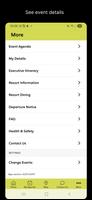
Brickster Events puts a personalized conference planner and the full event program on your Android device so you can make the most of live meetups, sessions, and sponsor activities. The app is designed to help attendees build an agenda, browse session details by room, date and time, and flag the talks and workshops they want to attend, while keeping critical event notices and sponsor information easy to reach. Whether you are attending a single-day workshop or a multi-track conference, Brickster Events keeps the essentials at your fingertips so you spend less time searching and more time participating.
Key features and what they do
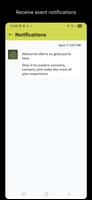
Brickster Events organizes program content into a searchable content library that lists session titles, abstracts, speakers, track assignments and precise scheduling. You can create a personalized agenda by selecting sessions and arranging them into a timeline view; the app highlights overlaps and suggests alternative sessions when conflicts arise. Sponsor pages and exhibitor details are accessible from the same interface so you can quickly review partner profiles, special offers, and booth locations. Event notices, last-minute schedule changes, and logistical announcements are grouped to reduce confusion, and simple tools let you mark sessions you plan to attend or follow up on later.
Interaction mechanics and controls
The interaction model focuses on easy navigation and few taps: swipe or scroll through the program by day and track, tap a session to reveal full details, and use a single action to add or remove it from your personalized agenda. Timeline controls let you jump to the current time or browse forward to future sessions; filters permit searching by room, speaker, topic, or level. Actions are direct and contextual — for example, session pages display room maps when available, and the agenda view offers quick links to contact or follow up options if the organizer provides attendee connection tools.
Progression and how your schedule evolves
Think of your event plan as a simple progression system: you begin by favoriting sessions to create a baseline schedule, then refine it as you discover new talks or respond to updates. The app supports marking sessions as attended or completed, which helps you keep track of notes and follow-ups across multiple days. For returning events or recurring conference series, your past agendas can serve as templates to accelerate planning. Notifications and reminders act like gentle prompts to keep you on track for must-see talks or prearranged meetings.
Visual style and event structure
The visual approach prioritizes clarity: clear typography for session titles, color-coding by track or room when provided, and compact timeline blocks that show start and end times at a glance. Events are presented according to their natural structure — single-day schedules, multi-day conferences, and parallel tracks are shown in formats that make it easy to compare sessions and manage movement between rooms. Maps, venue information and logistics appear alongside session information when available, helping you navigate large venues without flipping through paper programs.
Customization, templates and replay value
You can customize your agenda layout, set default filters to focus on topics of interest, and save planning preferences for future events. That customization adds replay value: each event becomes easier to plan as Brickster Events learns your preferred tracks and session types. Exporting or sharing a personal schedule with colleagues or co-attendees (when enabled by the organizer) simplifies coordination and reduces duplicated planning effort, making subsequent conferences faster to organize and more productive.
Accessibility, offline access and user experience
Accessibility considerations are built into the user experience with readable layouts, adjustable text sizes where supported by the device, and simplified navigation for quick access to the most important details. When organizers allow it, the app can download the event program for offline use so you can view schedules and speaker details without a network connection. Clear error messages and concise event notices help minimize confusion if parts of the program are missing or when connectivity is limited.
Networking and coordinating meetups
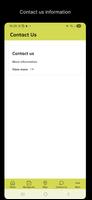
The app provides tools to discover other participants, view public attendee lists, and coordinate meetups or follow-ups if those features are enabled by the event organizer. Rather than inventing a specific messaging system, Brickster Events relies on organizer-provided connection options and makes it straightforward to find fellow attendees with similar interests, schedule a time to meet between sessions, and record contact follow-ups in your agenda notes.
Limitations and organizer dependence
Brickster Events is most effective when event organizers supply complete program and sponsor data; some events may have limited content or reduced features if information is incomplete. Networking and attendee-driven services also depend on broad participant adoption and organizer settings, so those experiences can vary from one event to another. Despite these constraints, the app remains a practical tool to centralize schedules, reduce printed materials, and streamline day-of planning.
If you want a single place to manage sessions, sponsors, notices and meetups during conferences, Brickster Events is built to simplify planning and help you focus on the content that matters most to you.